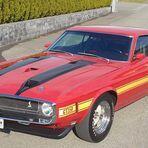
Magnus Jönsson August 6, 2019 Report Share August 6, 2019 Hej Magnus Jönsson Bromölla . Har en Shelby Gt-350 1970 importerad från USA förra året. Har 1985 ägt en likadan fast årsmodell 1969 som jag då renoverade från grunden. Denna är restaurerad av Staceys Concours restauration i Nashville enligt fabriksinstruktioner. Dock saknar den de svarta stripes på huven som är tidsenligt med 1970 1 Citera Link to comment Share on other sites More sharing options...
Lars Alfredsson August 6, 2019 Report Share August 6, 2019 Välkommen! Citera Link to comment Share on other sites More sharing options...
lasse.carina August 6, 2019 Report Share August 6, 2019 Välkommen Såg bilen både på powermeet i Hässleholm och nu i Ronneby,,,,, läcker Citera Link to comment Share on other sites More sharing options...



Recommended Posts
Join the conversation
You can post now and register later. If you have an account, sign in now to post with your account.
Note: Your post will require moderator approval before it will be visible.