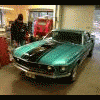
March 8, 201412 yr comment_133952 Hejsan!Hämtade bilen, en -69 mach1, förra helgen o redan hunnit åka en del då våren redan kommit. Är bosatt i Lidköping o har alltid varit bilintresserad. Ser fram emot många fina mil i sommar o att åka på diverse träffar/Kent Report
March 8, 201412 yr comment_133955 Kul välkommen hoppas vi träffas i sommar OBS vi tjatar ofta om bilder på skönheten så vi andra kan njuta lite/Leif Report
March 8, 201412 yr comment_133974 Jag välkomnar dig också, en jäkligt snygg Mach1 a har du, har en gång mekaten lika dan, gjorde en hel rekond. Report
March 9, 201412 yr comment_133991 Läcker bil!! Hoppas jag kan ta en närmare titt på den om vi ses på någon av träffarna i sommar. Välkommen! Report
March 9, 201412 yr comment_134000 Mycket snygg bil så där gjorde du ett kap. Hoppas jag får se den live under kommande säsong för jag gillar den årsmodellen. Report
March 11, 201412 yr comment_134049 Välkommen i klubben!Ska bli riktigt kul att få träffa dig i sommar!mvh Andreas Report

Join the conversation
You can post now and register later. If you have an account, sign in now to post with your account.
Note: Your post will require moderator approval before it will be visible.