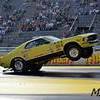
October 4, 201114 yr comment_108538 En liten film från Kjula, första riktiga repan med nya motorn!http://www.youtube.com/watch?v=1ImIvriJb8s Nästa år kan bli kul...//Mathias Report
October 5, 201114 yr comment_108539 Det där såg riktigt kul ut, släng in en liten rad när ni kör så kommer vi o. kollar lite.Micke Report
October 17, 201114 yr comment_108798 :clap::clap:Riktigt fräckt!UFO't i backspegeln var en kul gimmick. Report
October 18, 201114 yr comment_108803 Såg repan live, riktigt frän bil! Kul att få se lite fordar på strippen Report
November 10, 201114 yr Author comment_109479 Tackar, allihop!!! Visst är det kul med lite Ford 428CJ på strippen....inte det vanligaste, men desto roligare! Report
November 11, 201114 yr comment_109493 lycka till med en bra 9 sekundersrepa nästa år.ska bli kul att se o höra er live igen Report
November 15, 201114 yr Author comment_109659 Det blev 10.20 med 1.32 i 60fot, 211km/h...ok! Ny Converter hemma nu, ska nog kunna köra 9.70 med 220km/h....med det jag har i maskin!Helt ok i min klass i Superstock, typ 7 tiondelar under index. Report

Join the conversation
You can post now and register later. If you have an account, sign in now to post with your account.
Note: Your post will require moderator approval before it will be visible.