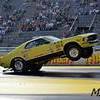
Greven CMC 053 October 4, 2011 Report Share October 4, 2011 En liten film från Kjula, första riktiga repan med nya motorn!http://www.youtube.com/watch?v=1ImIvriJb8s Nästa år kan bli kul...//Mathias Citera Link to comment Share on other sites More sharing options...
mhdin October 5, 2011 Report Share October 5, 2011 Det där såg riktigt kul ut, släng in en liten rad när ni kör så kommer vi o. kollar lite.Micke Citera Link to comment Share on other sites More sharing options...
stjernberg October 17, 2011 Report Share October 17, 2011 FRÄNT Greven!! Grym superstock du har.MVH Stjernberg Citera Link to comment Share on other sites More sharing options...
Daniel Linde October 17, 2011 Report Share October 17, 2011 Schysst Citera Link to comment Share on other sites More sharing options...
JanneJ October 17, 2011 Report Share October 17, 2011 :clap::clap:Riktigt fräckt!UFO't i backspegeln var en kul gimmick. Citera Link to comment Share on other sites More sharing options...
mogge October 18, 2011 Report Share October 18, 2011 Såg repan live, riktigt frän bil! Kul att få se lite fordar på strippen Citera Link to comment Share on other sites More sharing options...
JockeH October 19, 2011 Report Share October 19, 2011 Kung! Mkt imponerad. Härligt att se. Citera Link to comment Share on other sites More sharing options...
Greven CMC 053 November 10, 2011 Author Report Share November 10, 2011 Tackar, allihop!!! Visst är det kul med lite Ford 428CJ på strippen....inte det vanligaste, men desto roligare! Citera Link to comment Share on other sites More sharing options...
stefan_borgen November 11, 2011 Report Share November 11, 2011 lycka till med en bra 9 sekundersrepa nästa år.ska bli kul att se o höra er live igen Citera Link to comment Share on other sites More sharing options...
Alabama Grill November 13, 2011 Report Share November 13, 2011 Såg bra ut! Citera Link to comment Share on other sites More sharing options...
mogge November 13, 2011 Report Share November 13, 2011 Hur fort gick den på kjula? Citera Link to comment Share on other sites More sharing options...
Greven CMC 053 November 15, 2011 Author Report Share November 15, 2011 Det blev 10.20 med 1.32 i 60fot, 211km/h...ok! Ny Converter hemma nu, ska nog kunna köra 9.70 med 220km/h....med det jag har i maskin!Helt ok i min klass i Superstock, typ 7 tiondelar under index. Citera Link to comment Share on other sites More sharing options...



Recommended Posts
Join the conversation
You can post now and register later. If you have an account, sign in now to post with your account.
Note: Your post will require moderator approval before it will be visible.